
Concepts
How decodability scoring works
The decodability percentage estimates how much of a story matches the lesson or student's available patterns and words.
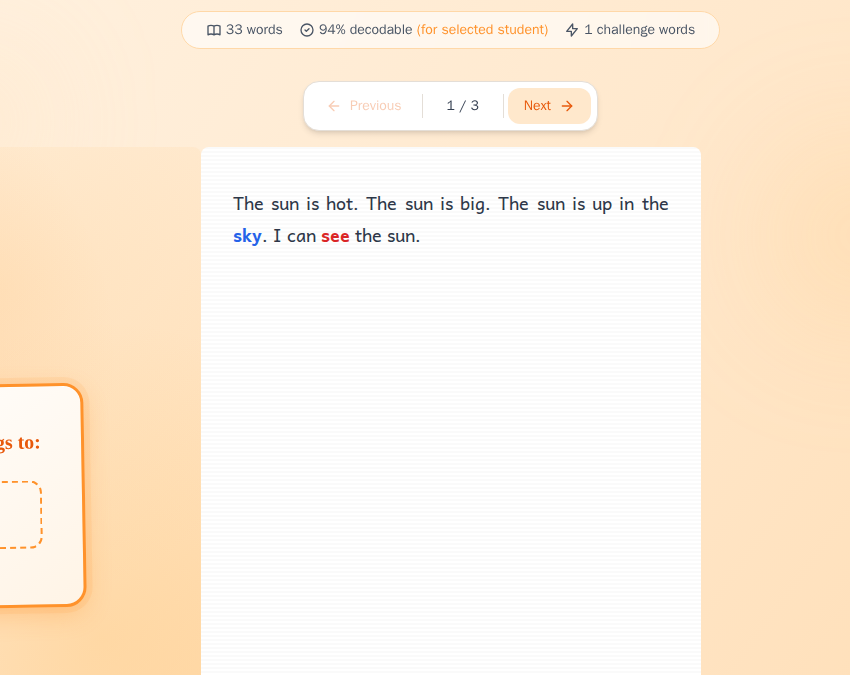
What the percentage means
The percentage estimates how many story words Cody treats as available for the selected lesson or student.
These kinds count as decodable in the score:
- Known words
- Focus words using the target pattern
- recognized Sight words
- accepted names and teacher-chosen topic words
Unknown words lower the score. Numbers and dates are left out of the calculation.
The story page does not approve or reject a story for you. A high percentage can still contain one important word the student cannot read, while a lower score may contain a few words you plan to teach first.
In short: use the percentage to begin your review, then look at the actual words.
The two kinds of highlighted word
Cody shows two word colors by default:
- Blue Focus words use the target pattern and count as decodable.
- Red Unknown words are not available in the selected pattern and word information, so they lower the percentage.
Known and Sight words remain plain. They also count as available.
Use the Focus words and Unknown words switches to hide either color. The switches change only the display; they do not recalculate the score.
See The four kinds of word in a story for the full classification.
Why 100% is not always necessary
A story written within a small pattern set has fewer useful words available. Allowing a small number of outside words can make the meaning clearer or the story more natural.
An outside word may be manageable when:
- you plan to explain it before reading;
- the student already knows the spoken word;
- you will read that word for the student; or
- the word is not important to the student’s independent practice.
The number of red words is not the only consideration. Their location and importance also matter. One unfamiliar word repeated throughout the story may need more attention than several minor words used once.
What to do with a low percentage
If the score or red words do not fit your lesson:
- Turn on Unknown words and read the red words in context.
- Decide whether you can explain, pre-teach, or read any of them aloud.
- Check the student’s Current Lesson, pattern grid, and high-frequency word list.
- Select Edit to replace words you do not want.
- Create another version if the story still requires too much support.
After editing, Cody analyzes the updated story again.
When a red word looks wrong
First, check whether every pattern in the word has the correct state in the student’s profile. Also check whether an irregular high-frequency word is marked as known for that student.
If the profile is correct and the classification still looks wrong, keep the story title and the word that was marked incorrectly when you contact support. Those details make the problem easier to investigate.
Still stuck? If something is broken rather than confusing, tell us what happened and we will look into it.