
Create
Choose what to make
Pick the reading material or activity that fits today's goal. The choices shown in Create can vary by plan and account.
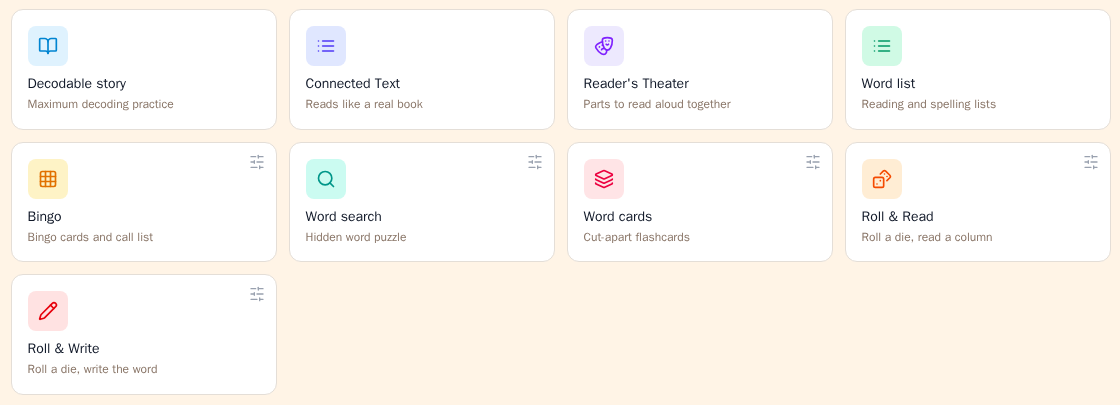
Choose by teaching goal
For careful decoding practice
Decodable story keeps close control of the words in the story. It repeats the lesson’s target words and gives the most direct practice with the current phonics pattern.
This is the best general-purpose place to begin.
For more natural reading
Connected text has a more natural plot and dialogue. It still uses words from the lesson, but it is less tightly controlled than a Decodable story.
Choose it when you want the reading to feel more like an ordinary book.
For reading aloud together
Reader’s Theater makes a script with named speaking parts. One reader can take a short, repeating role while another reads the longer narrator lines.
Choose it for repeated reading, fluency, and expression.
For facts instead of a story
Nonfiction makes an informational passage about a real topic. It has no characters or plot and is kept decodable for the lesson.
Nonfiction appears only when it is available for your account.
Choose a word activity
Word list makes separate reading and spelling lists for practice or dictation. A word list must be made from a lesson. It is not available when you start from a student.
Bingo makes 5-by-5 bingo cards and a call list.
Word search makes a hidden-word puzzle, a word bank, and an answer key.
Word cards makes cut-apart cards. Use them for flashcard practice, sorting, matching, or games.
Roll & Read makes a six-column grid. The student rolls a die and reads the matching column.
Roll & Write uses the same idea, but the student writes the words on the provided lines.
Fill in the blank makes decodable sentences with one missing word. It may also include a word bank and picture clues. This activity appears only when it is available for your account.
Use a passage you already have
Choose Level Existing Passage when you already have a passage you want to use.
Paste the passage into Cody. Cody matches it to the selected lesson and shows which words may need to be taught before the student reads it.
This choice works only when you start from a lesson. It also appears only when it is available for your account.
What happens when you choose a tile
- A reading-text tile opens a short setup window before Cody creates the text.
- Word list opens the word-list builder.
- An activity such as Bingo creates the activity right away.
- A small sliders button on an activity tile lets you choose its options before Cody creates it.
If no lesson or student is selected, the tiles stay unavailable. Choose the lesson or student first.
Why a choice may be missing or locked
A material may be unavailable because:
- it is not included in your plan;
- your organization has hidden that feature;
- the feature has not been enabled for your account; or
- it needs a lesson, but you started from a student.
A locked tile may offer an upgrade. A missing tile is not necessarily an error.
Where your work is saved
Cody saves generated work in Materials. You do not have to download a file to keep it.
If you made something for a student, the material is attached to that student. You can later use the student filter in Materials to find it.
Download it to use it
Saving is not the same as having it in front of a child. Take the download while the material is still on screen.
Select Download on the finished material. For an activity such as Bingo or Word cards you get the printable file straight away. For a story, Cody asks which version you want first:
- Storybook lays the story out one page at a time, the way it reads on screen. It opens a print view, so use your browser’s print dialog to print it or save it as a PDF.
- Standard is the plain reading copy, and the one to take if you are not sure.
- Fluency Passage is the continuous version for timed reading.
You can come back for the file later. Open Materials, find the item, and use Download there.
In short: the material is safe in Materials either way, but the download is what gets it onto a desk.
Still stuck? If something is broken rather than confusing, tell us what happened and we will look into it.