
Students
Setting up profiles for success
Add a student, choose their curriculum and lesson, then mark each phonics pattern as Known, Target, or Unknown so Cody can match material to them.
Add the student
- Open Students from the left menu.
- Select Add Student in the top right.
- Enter the student’s name.
- Choose a Curriculum. If your organization offers only one, it is chosen already.
- Choose the Starting Lesson — the lesson this student is working at now, not the one the class is on.
- Select Create Student.
The starting lesson is the one field worth slowing down for. Cody fills the whole pattern grid from it: everything before that lesson becomes Known, the lesson itself becomes Target, and everything after stays Unknown. Set it too high and the first story will use patterns the student cannot read.
The curricula Cody supports explains the choices in the curriculum menu.
In short: the profile takes under a minute, and the starting lesson does most of the work.
Then adjust the grid
The filled-in grid is a starting point, not an assessment. Two students at the same lesson rarely know the same patterns, and this is where you say so.
- Open Students from the left menu.
- Select a student.
- Stay on Profile.
- Scroll to Phonetic Patterns.
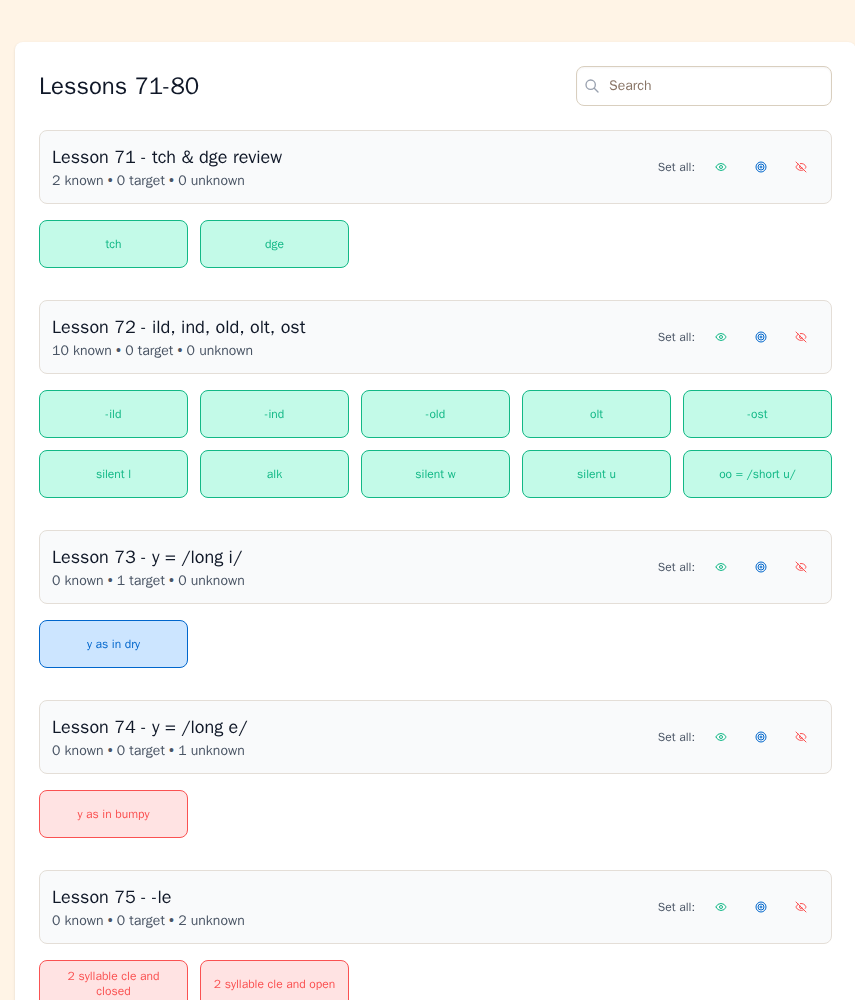
For a numbered curriculum, lessons are grouped into bands such as Lessons 1–10 and 11–20. Select a band to see its lessons and patterns. Use the search box if you already know which pattern you need.
What each state means
| State | Use it when | What Cody does |
|---|---|---|
| Known | The student can use the pattern with confidence | May use the pattern in student-based material |
| Target | The student is practicing the pattern now | Tries to include practice words; shows them in blue in stories |
| Unknown | The pattern is not taught or not ready | Avoids the pattern when possible; shows matching story words in red if they appear |
The tally above a lesson shows the number in each state, for example:
2 known • 1 target • 3 unknown
Known is not the same as taught once. Use it when the student can apply the pattern at the level needed for the material you are creating.
In short: Known is available, Target receives practice, and Unknown is avoided.
Changing a state
Selecting a pattern chip moves it one step around this loop:
Unknown (red) → Known (green) → Target (blue) → Unknown (red)
So from a red Unknown chip, one click makes it Known and two clicks make it Target. From a green Known chip, one click makes it Target and two bring it back to Unknown. The loop only runs one way, so if you overshoot, keep clicking and it comes round again.
To change a full lesson, find Set all on that lesson’s row and select the icon for the state you want. This is faster than changing every chip one at a time.
Changes save automatically.
How the grid affects new material
When you create from Student on Home, Cody uses this grid:
- More Known patterns give Cody more words it can use.
- Target patterns guide the practice words.
- Unknown patterns limit which words Cody should use.
If a story feels too difficult, check the red words and then return to the grid. A pattern may be marked Known before the student is ready to use it. If a story feels too limited, check whether secure patterns are still marked Unknown.
In short: the closer the grid is to the student’s current skills, the better Cody can match the material.
After changing Current Lesson
Changing Current Lesson re-syncs the curriculum patterns. Earlier lesson patterns become Known, patterns in the selected lesson become Target, and later patterns remain Unknown.
This can replace states you changed by hand. After moving the lesson, review the grid and make any student-specific adjustments again.
Students using Custom Pattern Selection
For a student using Custom Pattern Selection, the student list shows Manage patterns instead of the normal lesson selector.
Select Manage patterns to open the profile, then set Known, Target, and Unknown directly. The same three states and generation rules still apply.
Still stuck? If something is broken rather than confusing, tell us what happened and we will look into it.